
How to Start a Blog
This Post May Contain Affiliate Links. Please Read Our Disclosure Policy.
I’ve been on this blogging journey for 10 months now and I’ve learned so much about this industry and about myself. It has really been an incredible journey of growth. I had no idea what it took to establish a successful blog, and I’ve learned that it takes a lot. Blogging is not for the weak, especially when you are juggling a family and/or another job or another line of business. But it’s incredibly rewarding to watch the fruits of my labor come together, and connecting with so many women and mama’s who relate to our crazy life has been the greatest joy. I am by no means an expert [although I hope to be one day] but there are so many things I wish I had known in the beginning so I thought I would share a quick guide on how to start a blog for beginners.
This is part 1 of 5 of my Beginner Blogging Series. This post contains affiliate links. All thoughts and opinions are my own. See our disclosure for more information.
- How to Start a Blog
- How to Monetize a Blog
- How to Promote A Blog
- Photography Gear for Bloggers
- Instagram Growth Tips
HOW TO START A BLOG – THE ULTIMATE GUIDE
I started this journey in April of last year and I spent the first 6 months learning and writing content. I naively thought that I would write, take cute photos, and the masses would read. Hahahahaha. That notion makes me laugh because I really didn’t even think through how people would find my content. I just wanted to write and share about our life, and connect with mama’s who could relate to our chaotic life. I didn’t know what SEO meant, or domain authority. I didn’t own my own domain and I was using a free blog hosting site. I didn’t know how to approach or even find relevant sponsors to work with and I didn’t know what affiliate marketing meant. I didn’t have a facebook page or twitter account, and my Pinterest account was just a jumble of all the things I’d saved over the years. I didn’t know how to create pins or take a good quality photo and I certainly didn’t have an adequate camera.
Fast forward 10 months and things look totally different! Six months ago I invested in a Canon camera (7D Mark ii) and a 50mm lens. This was a game changer for me, both professionally and personally. I can’t tell you how fun it is to capture quality photos of my dearest family moments. It makes me so happy!! Three months ago I invested in a new blog design and since then my blog has really taken off. After 10 months of hard work, I have a thriving blog that has 10,000 monthly views and is growing daily, and I’m able to contribute to our monthly finances through a very fun and worthwhile venture. I have had the opportunity to work with some really fun sponsors since monetizing my blog a few months ago. I have just hired a team to help with the huge goals we have for 2018. My social accounts are growing rapidly and the absolute best part is that I’ve met so many life-long friends.
So let’s get to how to start a blog. If you are considering starting a blog, or if you’ve already started and you are struggling with growth, let me tell you that it takes a lot of time and hard work. I’ve invested not only time, but I’ve invested financially as well and those investments are already paying off. But I believe with the right tools, with the right training, and with consistent efforts, anyone can be successful in this world of blogging.
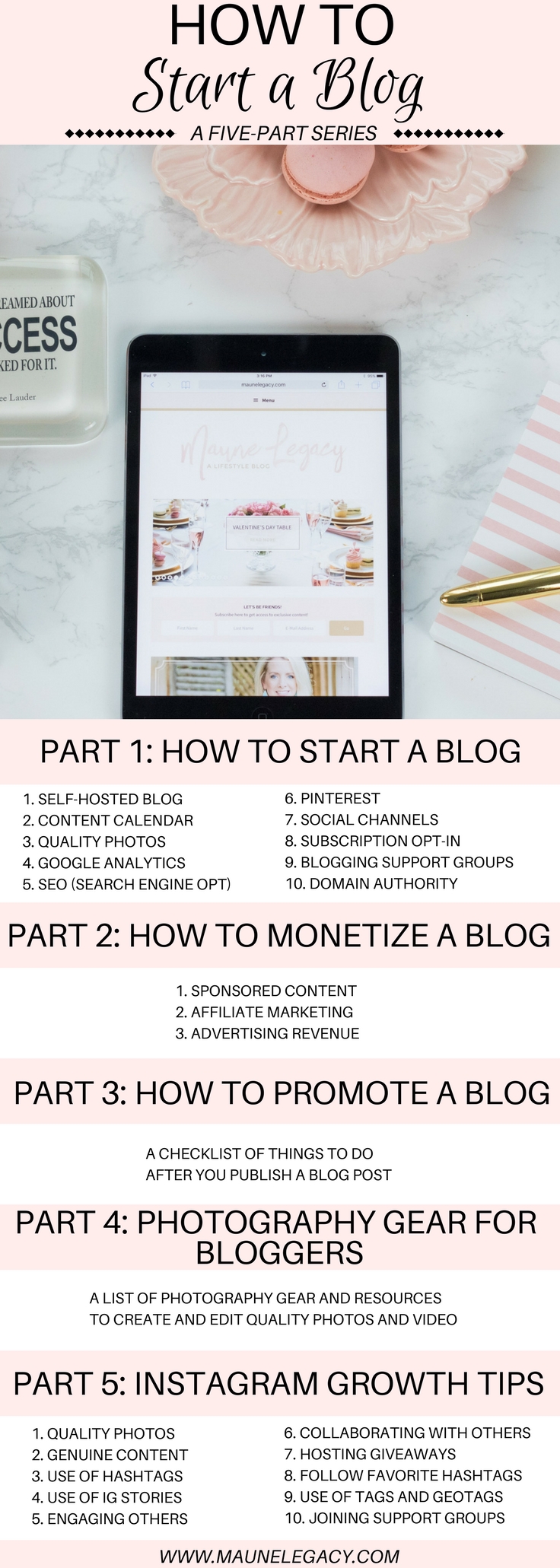
Here is a top 10 list of things to do. This How to Start a Blog Guide is not going to be overly technical and I’m not going to compare every option. My intent is to share what worked for me and share a few things that I think are important or worthwhile to do in the beginning.
SELF-HOSTED BLOG
Create a self-hosted blog with a savvy and creative theme design on WordPress.org. You want to own your blog and own your domain name. There are a lot of self-hosting options, I use godaddy.com which has a monthly fee of approximately $3. I found my theme designer on Etsy and had an amazing experience. She still answers questions and helps me with minor details. I highly recommend Studio Mommy. Google now requires that your site has an SSL certificate. I am not a tech person so I don’t fully understand the process, but my mother from Crawley Creations, who is a web genius, helped me with that process and the development part of my blog and I highly recommend her as well.
CONTENT CALENDAR
It’s important to stay true to who you are and consider who you want your audience to be when thinking through your content. I made a list of topics that I had an interest in sharing about including those topics that I could naturally discuss that I thought would be helpful to others. You also want content that is relative at any time of year. This is called Evergreen content and while content relative to the Holidays will be effective in bringing people to your blog, you want to have content that can be shared or enjoyed anytime throughout the year. Regarding holidays, you want to share holiday-related content 4-6 weeks prior to the holiday.
QUALITY PHOTOS
While there is a world of beautiful stocks photos, if your goal is to earn an income from your blog, you need to have crisp, quality photos that are your own. I invested in a Canon camera and have invested a lot of time in online training including taking quality photos and editing them as well. I use Photoshop when major editing is needed like head swaps, and I use Lightroom for all photos. When editing on my phone, I use Lightroom, Retouch, FaceTune, Snapseed, and VSCO (all for different things). Youtube is your friend, and there are reputable sites that sell refurbished cameras that can help with the cost.
GOOGLE ANALYTICS
My former free blogger account came with analytics already set up, I didn’t realize that WordPress did not have the same capability so my new blog design went live and I didn’t have a tool in place to track my analytics. Shame!! I now use Google Analytics every day to track how my content is doing, where my traffic source is coming from, where my audience is based, etc. Potential sponsors will also want to know about your analytics when considering working with you.
SEO
What is SEO? It’s something I think I will always want to continue learning about because it’s that big of a deal to your blog and that comprehensive. Search Engine Optimization is the key to getting your blog recognized by search engines so people can organically find your content. You want to use strategic long-tail keywords that are relevant, alt descriptions, and meta descriptions. I currently use SEMRush to search for relevant keywords, and I use a plugin called Yoast to help me key my SEO on each post. I plan to cover more on this topic at a later date, but I encourage you to search for training information now so you can learn about SEO from the beginning.
PINTEREST
Pinterest is a huge traffic source for my blog and I’m really just getting started. A few keys to Pinterest including verifying your website, creating high-quality vertical pins, and creating rich pins. Another best practice is to create a Board specific your blog (mine is called Maune Legacy Board) which will be where you pin your blog posts first. You will want to find collaborative boards to become a part of where you’ll help each other by sharing pins so your content is shared with a broader audience. I have recently started using Tailwind to schedule pins throughout the day. This is a paid service that has already been a huge game changer and worth every penny. I am seeing growth in followers, growth in the number of pins being shared, and growth in traffic to my blog. You can set up a trial for Tailwind and they’ll give you 100 free pins. Use this referral link for a $15 credit if you are interested in checking it out.
SOCIAL CHANNELS
Being active on multiple social channels will increase the professionalism and reach of your blog. Once I got serious about blogging I created a business page on Facebook and I opened a Twitter account, and I transitioned my personal Pinterest and Instagram accounts to match the branding of my blog. These platforms are important if you are wanting to reach a broader audience AND if you are wanting to monetize your blog. I wish I had done these things from the beginning, and I also wish I would’ve started utilizing StumbleUpon from the beginning. StumbleUpon is quickly becoming a major source of traffic for my blog. But one piece of advice from a busy mom of five, you likely won’t have time to focus on growing all platforms. I suggest focusing your attention on growing one channel so you have one primary channel with a large audience and a high level of engagement (more on this later).
SUBSCRIPTION OPT-IN
You want to give your readers several opportunities to opt-in to become a reader. I give my readers several opportunities to opt-in on my page and I’m working on a free download that I can offer new subscribers. A recent service I have paid for is called Milotree which provides a pop-up box when someone visits my blog. It gives my readers an opportunity to not only subscribe to my blog but also follow all of my social channels as well and it shows me valuable analytics. Along with your opt-in, you will want to have a service that manages your communication to your readership. I personally use Mail Chimp and I like the control it gives me over when and how often I connect with my readers.
BLOGGING SUPPORT GROUPS
Being a part of the blogging community has been such a valuable resource that has helped me grow. There are so many private Facebook groups that have different focuses, but they provide valuable advice, training information, and some help with engagement as well. Being a part of these communities has also introduced me to some amazing new friends and it’s so fun having a support group!
DOMAIN AUTHORITY
Domain authority is another concept I had never heard of, but as I was attempting to monetize my blog the subject came up. Domain authority is a search engine ranking score developed by Moz that predicts how well a website will rank on search engine result pages (SERPs), and it is something that some potential sponsors pay attention to. When I started my score was a 1, and it continues to increase as I work on improving my site. It can take a long time to increase your score, which is why I recommend learning about it in the beginning so you can implement best practices as you create or grow your blog.
I hope you found this How to Start a Blog Guide to be helpful in some way. The more you learn about this industry you’ll see that everyone has their own opinion on best practices and what to do in the beginning. I’ve shared what has been the most helpful to me personally. Please know there is always more to learn, I certainly learn something every day! Head on over to Part 2: How to Monetize Your Blog. Also, I loved these tips from my colleague Christiana on how to start a lifestyle blog, I love learning from others!
I hope you’ll pin this for those considering starting their journey in blogging:




So helpful, jennifer!!! You have come so far so fast! Proud of you, friend!!
Thanks sweet friend, best part of this is getting to reconnect with friends like you!
Such a great guide for beginners. Thanks for sharing!
Thank you!!
I think this is such a great start to your series! Each step you’ve outlined is so important! And I know this will be so helpful 🙂
These are perfect tips for those just starting a blog. I sure wish I would have had it laid out this clearly when I first started.
Thank you!! Appreciate your thoughts so much!!
Awesome info…thanks for the tips!
Thank you so much!
These are great tips for any beginner!
I hope so, thank you!!
Thanks for all the great tips! There are many that I really need to work on!!
So glad this was useful!! Thanks friend!
Great tips! I’ve been blogging for 4 years and just started to figure out SEO.
Oh it’s so big!!! But so key to being successful!
Focusing on Pinterest in the beginning is a great tip!! Helped me a lot at the start.
Yes!! I wish I had started sooner!
These are all such helpful tips for beginners!
Thank you!
Super helpful tips for all bloggers to be! I think one of the best things I’ve done is join support groups – I haven’t hit a year blogging yet, but even still I feel like there’s a lot more to learn!
Yes!! The support groups are the best!!
awesome tips for a new blogger
I hope so! Thanks!
This is super helpful to new bloggers like me! Your platforms look so professional, I would never know you’ve only been doing this 10 months. You mentioned some things I’ve never even heard of! I cannot wait to dive into the rest of your series.
Well this makes my day!! Thank you for your kind words!!